
Why does my neck hurt after working on a laptop?
By Dipanshu Goyal ·
Short version
- A bare laptop puts the screen too low, so you look down all day. A motion-capture study measured about 11° more neck bend on a laptop than on a desktop.
- The angle isn’t the injury. Holding it for hours is. The muscles at the back of your neck work the whole time to stop your head dropping further.
- Neck pain is normal in desk work, not a sign something is broken: around half of office workers report it in a given year.
- Fix the height first, then the keyboard, then the hours. A stand alone only fixes the first.
- Most neck pain of this kind eases in a few weeks. See a doctor if it doesn’t, or if there’s tingling or weakness.
If your neck is fine in the morning and sore by five, the laptop is the usual suspect. Not because laptops are badly made, but because the screen and keyboard are bolted together, and no position is right for both. This post covers what that does to your neck, why it hurts at the end of the day rather than the start, and what actually helps, in the order it helps.
The numbers at a glance
| What | Figure | Source |
|---|---|---|
| Extra neck bend on a bare laptop vs a desktop | about 11° | motion-capture study, 2018 |
| Office workers with neck pain in the past year | 45.5% of 512 | Belgian survey, 2007 |
| Pain-free office workers who developed neck pain within a year | about half of 53 | Australian cohort, 2009 |
| New neck pain with short breaks or posture shifts through the day vs none | about half as much | 193-worker trial, 6 months |
| Forward-head improvement with neck/upper-back exercise | about 8 weeks | meta-analysis of 10 trials, 2026 |
| How long most neck pain lasts | a few weeks | NHS |
How common is this?
Very. In a Belgian survey of 512 office workers, 45.5% had neck pain in the previous twelve months. An Australian study that followed 53 pain-free office workers for a year found that about half developed neck pain in that time. A 2020 study of 214 office workers in two countries found more sitting hours, higher job strain and stress all raised the risk.
So if you work at a computer and your neck hurts, you’re in the majority. That matters for how you think about it: this is a load problem, not a damage problem, and load problems respond to changing the load.
What a laptop does to your neck
Desk guidelines have asked for the same two things for decades: the top of the screen near eye level, and the keyboard at elbow height. On a desktop you can do both. On a laptop you can’t, because moving one moves the other. Put the laptop on the desk and the screen sits a foot too low. Raise it and the keyboard goes with it.
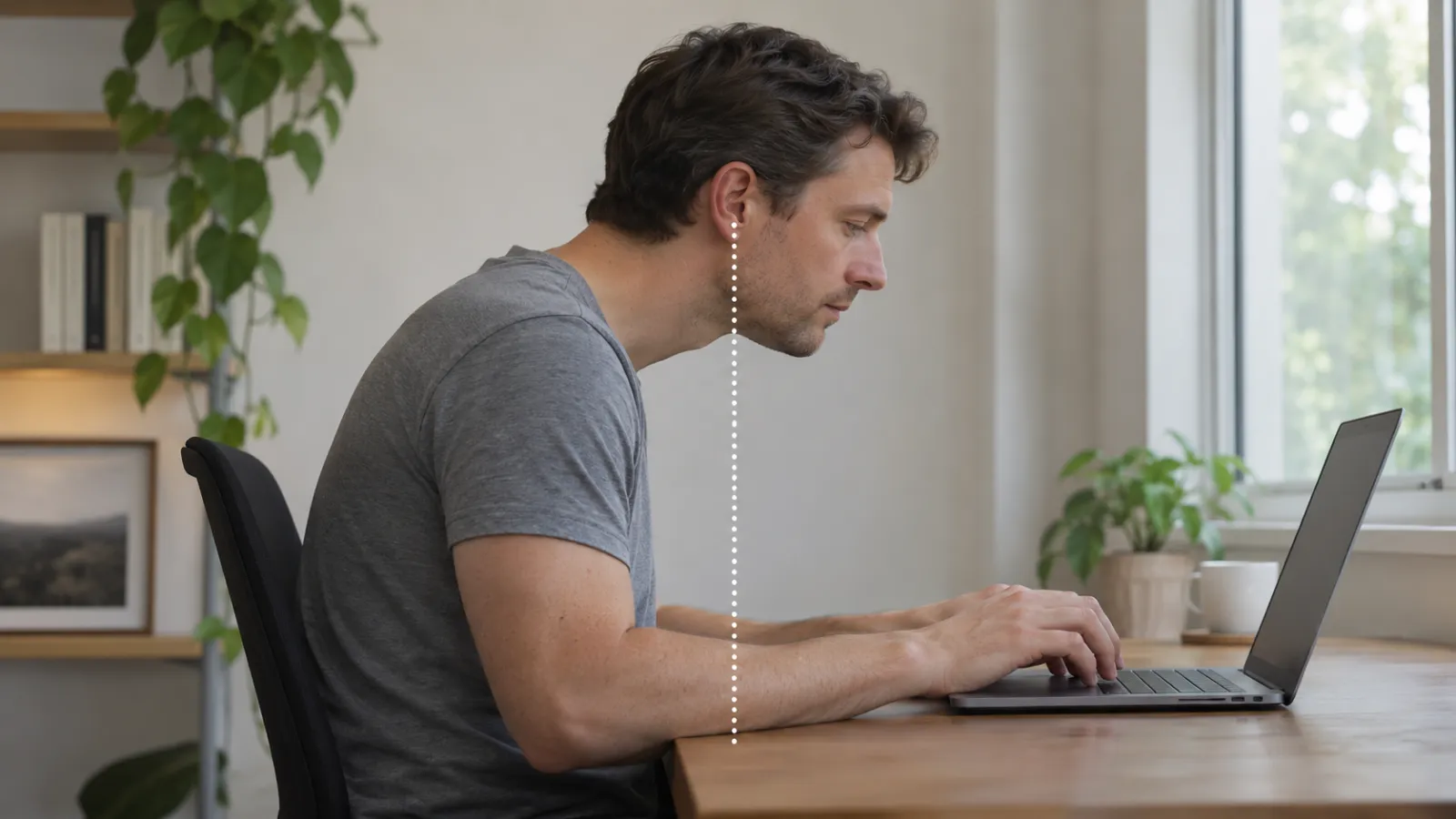
Almost everyone leaves it on the desk and looks down. In a motion-capture study, using a bare laptop bent the neck about 11° more than using a desktop computer. That’s the “tech neck” position: eyes to the screen, chin forward, the curve at the top of the spine flattened.
Why that hurts is simple mechanics. Your head weighs about as much as a bowling ball. Balanced over your shoulders, the neck muscles do little. Tipped forward, the muscles at the back of the neck and the top of the shoulders hold it there, and they don’t get a rest until you look up. That’s the tight, hot band people describe across the top of the shoulders and up into the skull. If the ache sits lower, between the shoulder blades, that’s the upper back: why it hurts at a computer.
Over time the position becomes the resting one. A 2019 review of 15 studies found adults with neck pain carry their heads further forward than people without it. Those studies can’t say which came first, but the direction is consistent. Our guide to forward head posture covers that in detail.
Why it hurts at five o’clock and not at nine
Because the position is held, not because it’s reached. A bad posture for ten minutes is nothing. The same posture for two hours, four times a day, is the problem.
Two things make laptop work worse than the same hours on a desktop. First, there’s no good position to return to, so there’s nothing to come back to when you notice. Second, you don’t notice. In a study of healthy adults typing for an hour, people’s necks stayed more bent all hour without a reminder than with one. Attention goes to the work and the head follows the screen.
Where you work matters too. A laptop on a desk is one thing; a laptop on the sofa or in bed is the same problem with the screen even lower and nothing to lean back on. If that’s most of your week, our laptop posture guide has setups for each place.
What to change, in order
1. Raise the screen. This is the one that removes the 11°. A stand, a stack of books, anything that puts the top of the screen at or just below eye level. Cornell’s laptop advice for anyone using a laptop as their main machine is exactly this: raise it so you can see the screen without bending your neck.
2. Add a keyboard and mouse. The stand creates a second problem: now the keyboard is at chin height. Any external keyboard, placed so your elbows sit by your sides at about 90°, puts the setup where OSHA’s workstation guide wants it. Without this step the stand trades neck pain for shoulder and wrist pain.
3. If you can’t raise it, tilt it and get closer. Cornell’s advice for occasional laptop use: tilt the screen back as far as it goes and bring the laptop toward you, so you look down less. It’s a smaller fix, but it’s the one that works in a café.
4. Break up the hours. The strongest trial on desk-work pain followed 193 office workers for six months. The group prompted to take short breaks or shift position through the day had about half the new neck pain of the group that wasn’t. Not stretches, not a better chair: fewer long, unbroken stretches of sitting.
5. Strengthen what holds your head up. If the forward-head position has become your resting one, exercise shifts it. A 2026 meta-analysis of ten randomised trials covering 550 people found that neck and upper-back exercise improved head position and reduced pain over about eight weeks.
6. Get a reminder for the drift. Steps 1 and 2 fix the setup at 9 a.m. Nothing in them stops your chin creeping toward the screen by 11. The typing study above tested a reminder for exactly this: people held their necks straighter with a nudge when they slouched than without one, and the effect was there within the hour.
Is tech neck permanent?
No, for the common kind. The NHS neck pain page says most neck pain lasts a few weeks, and recommends keeping the neck moving rather than resting it. The exercise trials above show the forward-head position itself moves back over a couple of months of work. What doesn’t change on its own is the setup: if the laptop stays flat on the desk, the load comes back the next day.
When to see a doctor
Desk-related neck pain is dull, worse at the end of the day, and better after a weekend. The NHS says to see a GP if the pain hasn’t eased after a few weeks, if painkillers like paracetamol or ibuprofen aren’t helping, if you’re worried, or if there are other symptoms such as pins and needles or a cold arm. Pain after a fall or an accident, pain with weakness in an arm or hand, or pain that wakes you at night, needs a doctor sooner, not later.
Where Slumpy fits
Slumpy is a posture reminder app for Mac. It doesn’t fix the height of your screen — a stand does that — but it handles the part a stand can’t: the slow lean toward the screen you don’t notice. It checks your posture with a camera glance of a second or two every few minutes, compared against a calibration you set, and a small dinosaur at the corner of your screen slouches when you do, with a gentle screen effect that spreads until you sit up. It also reminds you to stand, every 60 or 90 minutes, your choice (120 if you’d rather), which is the step with the best evidence above.
For laptop users specifically, it keeps a separate setup for each place you work, so the calibration at your desk isn’t applied to the sofa. If your laptop is where your neck pain comes from, raise the screen, add the keyboard, and let Slumpy catch the drift.
Questions people ask
What could be causing my neck pain while working on the computer?
Usually the screen height. A laptop flat on a desk bends the neck about 11° more than a desktop, and the muscles at the back of the neck hold that angle all day. Hours without a break, a chair you can’t lean back in, and a screen off to one side add to it.
Is tech neck permanent?
Not usually. Most neck pain eases within a few weeks, and the forward-head position improves over about eight weeks of neck and upper-back exercise in the trials. The setup has to change too, or the load returns.
Does a laptop stand help neck pain?
It removes the main cause, the low screen, but it creates a high keyboard. A stand plus an external keyboard and mouse is the setup that works; a stand alone moves the strain to your shoulders and wrists.
How long does laptop neck pain take to go away?
Days to a few weeks once the load changes, in most cases. If it hasn’t eased after a few weeks, or there’s tingling, a cold arm or weakness, see a GP.
Slumpy is a posture reminder app for Mac. It’s free on the Mac App Store — 3 hours of posture checks a day, no credit card, no account.
This article is general information, not medical advice. The studies are linked where they’re quoted; the figures are theirs.