
Laptop posture: how to work on a MacBook all day without wrecking your neck
By Dipanshu Goyal · · Updated
Short version
- A laptop breaks the first rule of desk setup by design: the screen and keyboard are joined, so one of them is always in the wrong place. Cornell’s ergonomics group says the design “violates a basic ergonomic requirement”.
- It costs your neck about 11° of extra bend compared with a desktop computer, in a motion-capture study. An older study found the stand-and-keyboard setup cut the load on the lower neck by about a quarter.
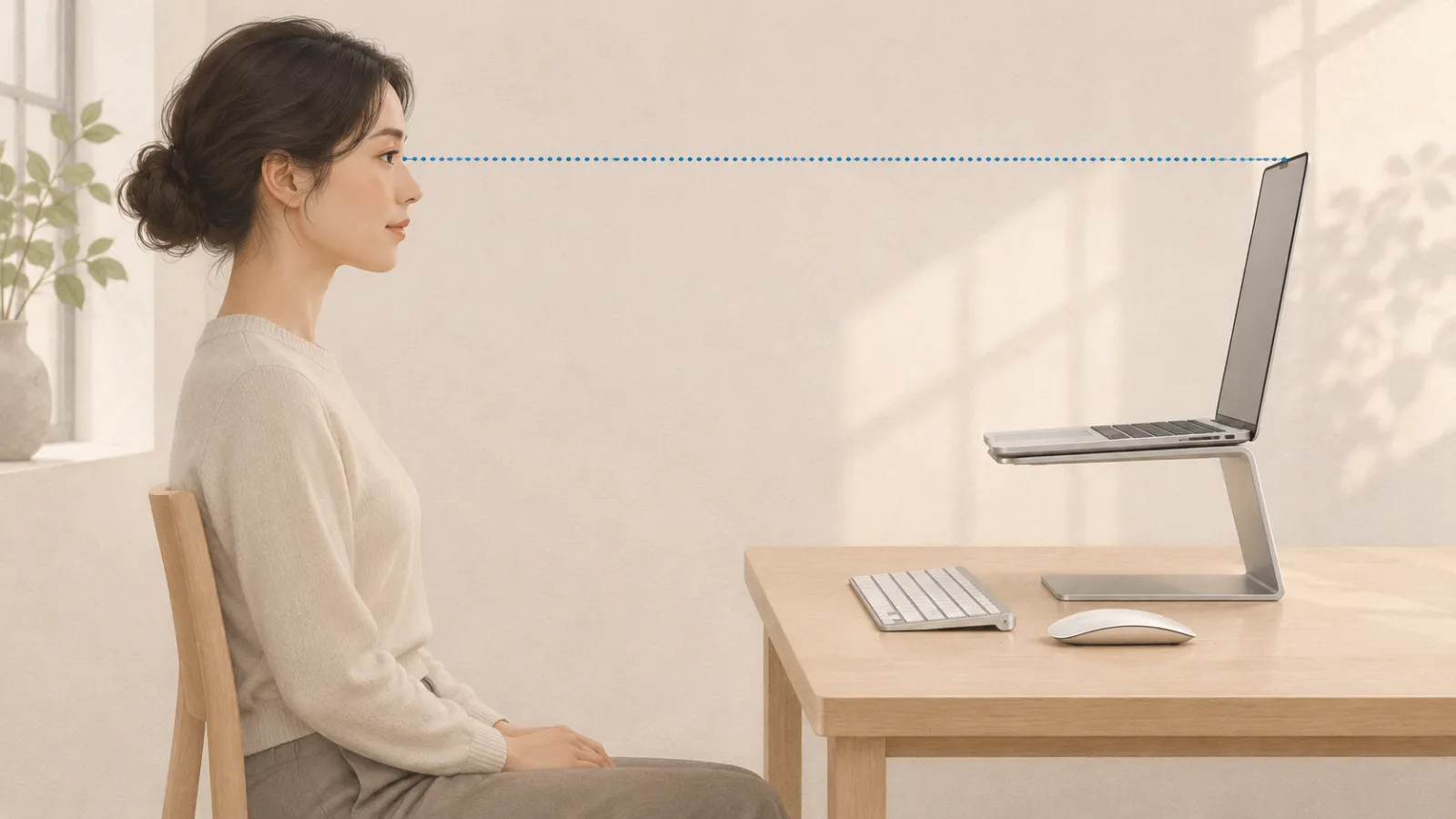
- Two fixes solve it: raise the laptop so the top of the screen is at eye level, and add a separate keyboard and mouse at elbow height. An external monitor is the same fix with more screen.
- When you can’t (sofa, café, train): tilt the screen back, pull the laptop closer, and treat it as a short session — then move.
- The part the stand doesn’t fix: you still drift forward during focused work. That’s what a reminder is for.
Most Mac users work on a MacBook, and most “how to sit” advice quietly assumes a monitor. The laptop is the special case that needs its own page. The thing that makes it portable is the thing that makes it bad for your neck, and the fix is cheap but not obvious. Here’s what the research says a bare laptop does to you, and the two changes that undo it. After that: what to do in the places where you can’t make them, and the one problem that survives all of it.
Why a laptop can’t be set up right
Desk guidelines have asked for the same two things for decades: the screen at eye level, and the keyboard at elbow height. A monitor and a keyboard can each go where they belong. A laptop can’t, because they’re attached. Raise the screen and the keyboard rises into your chest; put the keyboard where your hands want it and the screen sits a foot below your eyes. Cornell’s ergonomics group puts it plainly: the laptop’s design “violates a basic ergonomic requirement” for computer work. It adds that the guidelines written in the late 1970s all called for separating the two.
So you compromise, and almost everyone compromises the same way: the keyboard wins, the screen drops, and the head goes down and forward to meet it.
What it does to your neck, in numbers
That head-down position has been measured. In a motion-capture study of laptop work, using a bare laptop bent the neck about 11° more than using a desktop computer. An older study of laptop setups found that a stand plus a separate keyboard cut the load on the lower neck by about a quarter compared with the laptop flat on the desk.
Eleven degrees doesn’t sound like much until you hold it for eight hours. It’s the mechanism behind forward head posture: the eyes go to the screen, the head follows, and the muscles at the back of the neck do the holding all day. For office workers, neck pain is the most common complaint of any occupation: studies collected in a 2018 review report that 42–63% have it in a given year. A low screen is the most direct way a desk produces it. If your neck already hurts, why laptop work causes neck pain goes through what helps, in order.
Fix 1: raise the laptop
Cornell’s advice for anyone who uses a laptop as their main machine: raise it so you can see the screen without bending your neck. In practice that’s the same target as a monitor: top of the screen at or just below eye level. The whole set of numbers is in How to sit at a computer. Any stable stand works; so does a stack of books. The MacBook’s own hinge doesn’t go far enough: tilting the screen back helps, but the top edge is still well below your eyes.
Once it’s raised, the built-in keyboard is unusable at that height, which is the point: it forces fix 2.
Fix 2: separate keyboard and mouse
Add an external keyboard and mouse at elbow height. OSHA’s guide has elbows by your sides, bent about 90°, and wrists straight. Any keyboard; it doesn’t need to be ergonomic to fix the problem, it needs to be separate. The mouse goes right beside it at the same height.
Together, the two fixes turn a laptop into a monitor-and-keyboard setup, which is what the guidelines were written for. An external monitor does the same job with more screen; if you have one, put it straight in front of you and use the laptop as a second display or close it.
Total cost of the fix: a stand and a keyboard. For a MacBook user it’s the single highest-value change available, and it’s a one-time one.
When you can’t: sofa, bed, café, train
Sometimes the laptop is on your lap, and no stand is coming. Three things help, none of them fully:
- Tilt the screen back as far as it goes and bring the laptop closer, so you look down less. This is Cornell’s advice for occasional use, as opposed to all-day use.
- Change position often. A bad posture held for ten minutes is a non-event; the same posture for two hours is the problem. The strongest evidence on desk pain is for interrupting long stretches, not for any one position.
- Treat it as a short session. If the sofa is where you do real work for hours, it needs a lap desk and a stand like anywhere else.
The problem the stand doesn’t fix
Here’s the honest part. Raise the screen, add the keyboard, and your setup is right — at 9 a.m. By 11 you’ve leaned in to read something, your chin has drifted toward the screen, your shoulders have rounded, and you haven’t noticed, because you were working. The stand removed the reason to slouch; it didn’t remove the slouching. In a study of an hour of typing, people with a reminder on held their neck about 2.8° less bent than without one, consistently across the hour. That was on a setup that was already correct. The drift is a habit, and habits need a cue; here’s how long that takes.
Where Slumpy fits
Slumpy is a posture reminder app for Mac, and it’s the second half of the laptop fix. The stand and keyboard put you in the right position; Slumpy notices when you’ve drifted out of it. It checks your posture with a camera glance of a second or two every few minutes, camera off in between. It uses the MacBook’s built-in camera or an external webcam. When you’ve slumped, a small dinosaur slouches with you and a gentle screen effect spreads until you sit back up. It saves a separate setup for each place you sit, so your desk-with-stand and your sofa can each have their own calibration. It switches to your external-monitor setup by itself when you plug one in. It also reminds you to stand — every 60 or 90 minutes, your choice — which is the part the evidence supports best. Nothing is recorded; it works offline; no account.
Questions people ask
Is working on a laptop bad for your posture?
A bare laptop on a desk puts the screen well below eye level, which bends the neck about 11° more than a desktop computer and is the usual cause of forward head posture in laptop users. Raised on a stand with a separate keyboard, a laptop is as good as any desktop.
What is the best laptop position for your neck?
Raised so the top of the screen is at or just below eye level, an arm’s length away, straight in front of you, with a separate keyboard and mouse at elbow height. If you can’t raise it, tilt the screen back and keep the session short.
Do I need a laptop stand?
If you work on a laptop for more than an hour at a time, yes — or a stack of books, or an external monitor. The stand only works with a separate keyboard, because raising the laptop puts its own keyboard too high.
Does a laptop stand fix posture on its own?
It fixes the setup, not the drift. You’ll still lean forward during focused work without noticing; that’s a reminder’s job, and the evidence says reminders reduce neck bend measurably while they’re on.
Can I use the MacBook camera for a posture app on a stand?
Yes. The built-in camera sits at the top of the raised screen, which is a good angle for it; an external webcam works too. Slumpy supports both. Before giving any app your camera, see what to check about a posture app’s privacy.
Slumpy is a posture reminder app for Mac. It’s free on the Mac App Store — 3 hours of posture checks a day, no credit card, no account.
This article summarises published research and official ergonomics guidance, linked where quoted; it is not medical advice.